Prepare the baseline information.
- Instructions
- Example
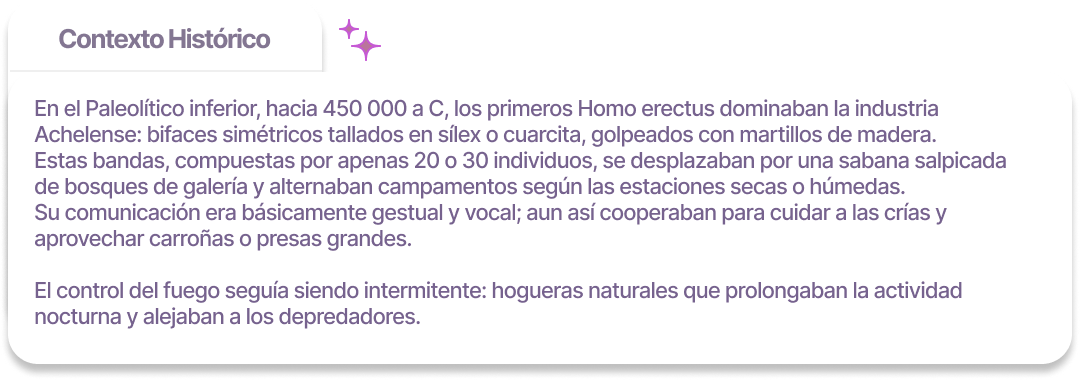
Using the data that the student has collected in their Historical Data table, a small list will be created.
- Period
- Technology
- Environment
- Society
- Key Innovation
Create the prompt for AI.
To develop a quality Historical Context using Artificial Intelligence, it is essential that students learn to formulate a good prompt: a clear and precise message that indicates exactly what we want the AI to write.
- Instructions
- Example
- Present the objective:
Explain that you want to write a short paragraph that describes what life was like in a specific era, based only on the data they already have. - Give clear instructions:
The message should explicitly ask that:- Only the provided information is used (without inventing or adding external data).
- It is written in a specific format and style.
- Specify format and style:
- Length: A single paragraph of 90 to 120 words.
- Tone: Informative and precise, written in third person.
- Beginning: The paragraph should start with a specific phrase such as “In the Lower Paleolithic…”.
- Information integration: Do not repeat the list of data or cite sources; everything should be smoothly integrated into the text.
- Always use simple and direct language in the prompt to avoid misinterpretations.
Critical review
The goal is for students to learn to critically review AI-generated content and identify errors by comparing the generated text with the original sources.
- Instructions
- Example
- Compare point by point with the original information:
- Check if the text includes all the data provided:
- Period
- Technology
- Environment
- Society
- Key innovation
- Verify if those data are reflected correctly, using the Historical Data and the textbook as references.
- Check if the text includes all the data provided:
- Detect unauthorized information:
- Check if the text adds information that does not appear in their Historical Data or in the book.
- If they detect additions (such as inventions, events, technologies, or customs not mentioned in the book), they should consider it an error.
- Identify historical errors:
- Check if the text includes anachronisms or incorrect data (for example, mentioning pottery in the Lower Paleolithic).
- Record errors in an Error Table
Re-Prompt
- If there are small errors, the student can correct the text directly.
- If there are many errors, it is recommended to redo the prompt with better adjustments.